

[Nov-2021] Free MS-100 Exam Dumps to Improve Exam Score
2021 Realistic MS-100 Dumps Exam Tips Test Pdf Exam Material
Schedule exam
Languages: English, Japanese
Retirement date: none
This exam measures your ability to accomplish the following technical tasks: design and implement Microsoft 365 services; manage user identity and roles; manage access and authentication; and plan Office 365 workloads and applications.
NEW QUESTION 115
You have the Microsoft Azure Active Directory (Azure AD) users shown in the following table.
Your company uses Microsoft Intune.
Several devices are enrolled in Intune as shown in the following table.
The device compliance policies in Intune are configured as shown in the following table.
You create a conditional access policy that has the following settings:
* The Assignments settings are configured as follows:
- Users and groups: Group1
- Cloud apps: Exchange Online
- Conditions: Include All device state, exclude Device marked as compliant
* Access controls is set to Block access.
For each of the following statements, select yes if the statement is true. Otherwise, select No.
NOTE: Each correct selection is worth one point.
Answer:
Explanation:
Explanation
Box 1:
Yes. User1 is in Group1. The Conditional Access Policy applies to Group1. The Conditional Access Policy blocks access unless the device is marked as compliant.
BitLocker is disabled for Device1. Device1 is in Group3 which is assigned device Policy1. The BitLocker policy in Policy1 is 'not configured' so BitLocker is not required.
Therefore, Device1 is compliant so User1 can access Exchange online from Device1.
Box 2:
No. User1 is in Group1. The Conditional Access Policy applies to Group1. The Conditional Access Policy blocks access unless the device is marked as compliant.
BitLocker is disabled for Device2. Device2 is in Group4 which is assigned device Policy2. The BitLocker policy in Policy2 is 'Required so BitLocker is required.
Therefore, Device2 is not compliant so User1 cannot access Exchange online from Device2.
Box3:
Yes. User2 is in Group2. The Conditional Access Policy applies to Group1. The Conditional Access Policy does not apply to Group2. So even though Device2 is non-compliant, User2 can access Exchange Online using Device2 because there is no Conditional Access Policy preventing him/her from doing so.
Reference:
https://docs.microsoft.com/en-us/azure/active-directory/conditional-access/conditions
NEW QUESTION 116
Your network contains an Active Directory domain named adatum.com that is synced to Microsoft Azure Active Directory (Azure AD).
The domain contains 100 user accounts.
The city attribute for all the users is set to the city where the user resides.
You need to modify the value of the city attribute to the three-letter airport code of each city.
What should you do?
- A. From the Microsoft 365 admin center, select the users, and then use the Bulk actions option.
- B. From Azure Cloud Shell, run the Get-MsolUser and Set-MSOluser cmdlets.
- C. From Active Directory Administrative Center, select the Active Directory users, and then modify the Properties settings.
- D. From Windows PowerShell on a domain controller, run the Get-AzureADUser and Set-AzureADUser cmdlets.
Answer: C
Explanation:
Explanation
The user accounts are synced from the on-premise Active Directory to the Microsoft Azure Active Directory (Azure AD). Therefore, the city attribute must be changed in the on-premise Active Directory.
You can modify certain attributes of multiple user accounts simultaneously by selecting them in Active Directory Administrative Center or Active Directory Users and Computers, right clicking then selecting Properties.
The other three options all suggest modifying the city attribute of the users in the Azure Active Directory which is incorrect.
Reference:
https://blogs.technet.microsoft.com/canitpro/2015/11/25/step-by-step-managing-multiple-user-accounts-via-activ
NEW QUESTION 117
You have an on-premises Microsoft SharePoint Server 2016 environment.
You create a Microsoft 365 tenant.
You need to migrate some of the SharePoint sites to SharePoint Online. The solution must meet the following requirements:
* Microsoft OneDrive sites must redirect users to online content.
* Users must be able to follow both on-premises and cloud-based sites.
* Users must have a single SharePoint profile for both on-premises and on the cloud.
When users search for a document by using keywords, the results must include online and on-premises results.
From the SharePoint Hybrid Configuration Wizard, you select the following features:
* Hybrid business to business (B2B) sites
* Hybrid OneDrive
* Hybrid Search
Which two requirements are met by using the SharePoint Hybrid Configuration Wizard features? Each correct answer presents a complete solution.NOTE: Each correct selection is worth one point.
- A. OneDrive sites must redirect users to online content.
- B. When users search for a document by using keywords, the results must include online and on-premises results.
- C. Users must be able to follow both on-premises and cloud-based sites.
- D. Users must have a single SharePoint profile for both on-premises and on the cloud.
Answer: A,B
NEW QUESTION 118
You have a data loss prevention (DLP) policy.
You need to increase the likelihood that the DLP policy will apply to data that contains medical terms from the International Classification of Diseases (ICD-9-CM). The solution must minimize the number of false positives.
Which two settings should you modify? To answer, select the appropriate settings in the answer area.
NOTE:Each correct selection is worth one point.
Answer:
Explanation:
Explanation
You can tune your rules by adjusting the instance count and match accuracy to make it harder or easier for content to match the rules. Each sensitive information type used in a rule has both an instance count and match accuracy.
To make the rule easier to match, decrease the min count and/or increase the max count. You can also set max to any by deleting the numerical value.
To minimize the number of false positives, we need to increase the minimum match accuracy.
A sensitive information type is defined and detected by using a combination of different types of evidence.
Commonly, a sensitive information type is defined by multiple such combinations, called patterns. A pattern that requires less evidence has a lower match accuracy (or confidence level), while a pattern that requires more evidence has a higher match accuracy (or confidence level).
Reference:
https://docs.microsoft.com/en-us/office365/securitycompliance/data-loss-prevention-policies
https://docs.microsoft.com/en-us/office365/securitycompliance/what-the-sensitive-information-types-look-for#in
NEW QUESTION 119
You have the Microsoft Azure Active Directory (Azure AD) users shown in the following table.
Your company uses Microsoft Intune.
Several devices are enrolled in Intune as shown in the following table.
The device compliance policies in Intune are configured as shown in the following table.
You create a conditional access policy that has the following settings:
* The Assignments settings are configured as follows:
- Users and groups: Group1
- Cloud apps: Exchange Online
- Conditions: Include All device state, exclude Device marked as compliant
* Access controls is set to Block access.
For each of the following statements, select yes if the statement is true. Otherwise, select No.
NOTE: Each correct selection is worth one point.
Answer:
Explanation:
Explanation
Box 1:
Yes. User1 is in Group1. The Conditional Access Policy applies to Group1. The Conditional Access Policy blocks access unless the device is marked as compliant.
BitLocker is disabled for Device1. Device1 is in Group3 which is assigned device Policy1. The BitLocker policy in Policy1 is 'not configured' so BitLocker is not required.
Therefore, Device1 is compliant so User1 can access Exchange online from Device1.
Box 2:
No. User1 is in Group1. The Conditional Access Policy applies to Group1. The Conditional Access Policy blocks access unless the device is marked as compliant.
BitLocker is disabled for Device2. Device2 is in Group4 which is assigned device Policy2. The BitLocker policy in Policy2 is 'Required so BitLocker is required.
Therefore, Device2 is not compliant so User1 cannot access Exchange online from Device2.
Box3:
Yes. User2 is in Group2. The Conditional Access Policy applies to Group1. The Conditional Access Policy does not apply to Group2. So even though Device2 is non-compliant, User2 can access Exchange Online using Device2 because there is no Conditional Access Policy preventing him/her from doing so.
Reference:
https://docs.microsoft.com/en-us/azure/active-directory/conditional-access/conditions
NEW QUESTION 120
Your company has a Microsoft Azure Active Directory (Azure AD) tenant named contoso.onmicrosoft.com that contains a user named User1.
You suspect that an imposter is signing in to Azure AD by using the credentials of User1.
You need to ensure that an administrator named Admin1 can view all the sign in details of User1 from the past
24 hours.
To which three roles should you add Admin1? Each correct answer presents a complete solution.
NOTE: Each correct selection is worth one point.
- A. Security administrator
- B. User administrator
- C. Security reader
- D. Password administrator
- E. Reports reader
- F. Compliance administrator
Answer: A,C,E
Explanation:
Users in the Security Administrator, Security Reader, Global Reader, and Report Reader roles can view the sign in details.
Reference:
https://docs.microsoft.com/en-us/azure/active-directory/reports-monitoring/concept-sign-ins
NEW QUESTION 121
You are configuring an enterprise application named TestApp in Microsoft Azure as shown in the following exhibit.
Use the drop-down menus to select the answer choice that completes each statement based on the information presented in the graphic.
NOTE: Each correct selection is worth one point.
Answer:
Explanation:
Explanation:
References:
https://docs.microsoft.com/en-us/azure/active-directory/manage-apps/application-proxy-configure-hard-coded-link-translation
NEW QUESTION 122
You have a Microsoft 365 subscription.
A new corporate security policy states that you must automatically send DLP incident reports to the users in the legal department.
You need to schedule the email delivery of the reports. The solution must ensure that the reports are sent as frequently as possible.
How frequently can you schedule the delivery of the reports?
- A. monthly
- B. daily
- C. weekly
- D. hourly
Answer: C
Explanation:
Section: [none]
Explanation:
From the Dashboard in the Security and Compliance center, you can view various reports including the DLP Incidents report. From there you can configure a schedule to email the reports. In the schedule configuration, there are two choices for the frequency: Weekly or Monthly. Therefore, to ensure that the reports are sent as frequently as possible, you need to select Weekly.
Reference:
https://docs.microsoft.com/en-us/microsoft-365/security/office-365-security/create-a-schedule-for-a-report
NEW QUESTION 123
Please wait while the virtual machine loads. Once loaded, you may proceed to the lab section. This may take a few minutes, and the wait time will not be deducted from your overall test time.
When the Next button is available, click it to access the lab section. In this section, you will perform a set of tasks in a live environment. While most functionality will be available to you as it would be in a live environment, some functionality (e.g., copy and paste, ability to navigate to external websites) will not be possible by design.
Scoring is based on the outcome of performing the tasks stated in the lab. In other words, it doesn't matter how you accomplish the task, if you successfully perform it, you will earn credit for that task.
Labs are not timed separately, and this exam may have more than one lab that you must complete. You can use as much time as you would like to complete each lab. But, you should manage your time appropriately to ensure that you are able to complete the lab(s) and all other sections of the exam in the time provided.
Please note that once you submit your work by clicking the Next button within a lab, you will NOT be able to return to the lab.
You may now click next to proceed to the lab.
Lab information
Use the following login credentials as needed:
To enter your username, place your cursor in the Sign in box and click on the username below.
To enter your password, place your cursor in the Enter password box and click on the password below.
Microsoft 365 Username: [email protected]
Microsoft 365 Password: m3t^We$Z7&xy
If the Microsoft 365 portal does not load successfully in the browser, press CTRL-K to reload the portal in a new browser tab.
The following information is for technical support purposes only:
Lab Instance: 11440873
You need to ensure that when Lynne Robbins attempts to sign in to the Microsoft Office 365 portal, Lynne Robbins is prompted to authenticate by using multiple methods.
To answer, sign in to the Microsoft 365 portal.
Answer:
Explanation:
See explanation below.
Explanation
You need to enable Multi-Factor Authentication for Lynne Robbins.
1. Sign in to the Microsoft 365 Admin Center.
2. In the left navigation pane, expand the Users section and select Active Users.
3. Click the 'Multi-factor authentication' link.
4. Select Lynne Robbins.
5. In the right navigation pane, select the 'Enable' link to enable MFA for the account.
6. Confirm the setting by clicking the 'Enable multi-factor authentication' button.
7. Click the Close button to close the confirmation window.
NEW QUESTION 124
Your on-permission network contains the web application shown in the following table.
You purchase Microsoft 365, and the implement directory synchronization.
You plan to publish the web applications.
You need to ensure that all the applications are accessible by using the My Apps portal. The solution must minimize administrative effort.
What should you do first?
- A. Deploy one conditional access policy.
- B. Create four application registrations.
- C. Create a site-to-site VPN from Microsoft Azure to the on-premises network.
- D. Deploy one connector.
Answer: D
NEW QUESTION 125
You have a Microsoft 365 subscription. All users have client computers that run Windows 10 and have Microsoft Office 365 ProPlus installed.
Some users in the research department work for extended periods of time without an Internet connection.
How many days can the research department users remain offline before they are prevented from editing Office documents?
- A. 0
- B. 1
- C. 2
- D. 3
Answer: D
Explanation:
After 30 days, Microsoft Office 365 ProPlus will go into reduced functionality mode. When this happens, users will be able to open files but they won't be able to edit them.
As part of the installation process, Office 365 ProPlus communicates with the Office Licensing Service and the Activation and Validation Service to obtain and activate a product key. Each day, or each time the user logs on to their computer, the computer connects to the Activation and Validation Service to verify the license status and extend the product key. As long as the computer can connect to the Internet at least once every 30 days, Office remains fully functional. If the computer goes offline for more than 30 days, Office enters reduced functionality mode until the next time a connection can be made.
Reference:
https://docs.microsoft.com/en-us/deployoffice/overview-of-licensing-and-activation-in-office-365-proplus
NEW QUESTION 126
Which migration solution should you recommend for Project1?
- A. From the Exchange admin center, start a migration and select Staged migration.
- B. From the Microsoft 365 admin center, start a data migration and click Exchange as the data service.
- C. From the Exchange admin center, start a migration and select Cutover migration.
- D. From the Microsoft 365 admin center, start a data migration and click Upload PST as the data service.
Answer: B
Explanation:
Section: [none]
Explanation:
* Project1: During Project1, the mailboxes of 100 users in the sales department will be moved to Microsoft
365.
* Fabrikam does NOT plan to implement identity federation.
* All users must be able to exchange email messages successfully during Project1 by using their current email address.
During Project1, some users will have mailboxes in Microsoft 365 and some users will have mailboxes in Exchange on-premises. To enable users to be able to exchange email messages successfully during Project1 by using their current email address, we'll need to configure hybrid Exchange.
A new way to migrate mailboxes in a hybrid Exchange configuration is to use the Microsoft 365 data migration service. The data migration service can migrate Exchange, SharePoint and OneDrive. Therefore, we need to start a data migration and click Exchange as the service to be migrated.
Note:
There are several versions of this question in the exam. The question has two possible correct answers:
* From Exchange admin center, start the migration and select Remote move migration.
* From the Microsoft 365 admin center, start a data migration and click Exchange as the data service.
Other incorrect answer options you may see on the exam include the following:
* From Exchange Online PowerShell, run the New-MailboxImportRequest cmdlet.
* From Exchange Online PowerShell, run the New-MailboxExportRequest cmdlet
* From the Microsoft 365 admin center, start a data migration and click Outlook as the data service.
* From the Exchange admin center, start a migration and select Cutover migration.
Reference:
https://docs.microsoft.com/en-us/fasttrack/O365-data-migration
https://docs.microsoft.com/en-us/exchange/hybrid-deployment/move-mailboxes
NEW QUESTION 127
Your network contains an Active Directory domain named contoso.com.
You have a Microsoft 365 subscription.
You have a Microsoft Azure Active Directory (Azure AD) tenant named contoso.onmicrosoft.com.
You implement directory synchronization.
The developers at your company plan to build an app named App1. App1 will connect to the Microsoft Graph API to provide access to several Microsoft Office 365 services.
You need to provide the URI for the authorization endpoint that App1 must use.
What should you provide?
- A. https://contoso.com/contoso.onmicrosoft.com/app1
- B. https://myapps.microsoft.com
- C. https://login.microsoftonline.com/
- D. https://login.microsoftonline.com/contoso.onmicrosoft.com/
Answer: D
Explanation:
Explanation
In a single tenant application, sign-in requests are sent to the tenant's sign-in endpoint. For example, for contoso.onmicrosoft.com the endpoint would be: https://login.microsoftonline.com/contoso.onmicrosoft.com.
Requests sent to a tenant's endpoint can sign in users (or guests) in that tenant to applications in that tenant.
Reference:
https://docs.microsoft.com/en-us/azure/active-directory/develop/howto-convert-app-to-be-multi-tenant
NEW QUESTION 128
Your network contains an Active Directory domain named contoso.com. The domain contains the file servers shown in the following table.
A file named File1.abc is stored on Server1. A file named File2.abc is stored on Server2. Three apps named App1, App2, and App3 all open files that have the .abc file extension.
You implement Windows Information Protection (WIP) by using the following configurations:
* Exempt apps: App2
* Protected apps: App1
* Windows Information Protection mode: Block
* Network boundary: IPv4 range of 192.168.1.1-192.168.1.255
You need to identify the apps from which you can open File1.abc
For each of the following statements, select Yes if the statement is true. Otherwise, select No.
NOTE: Each correct selection is worth one point.
Answer:
Explanation:
Explanation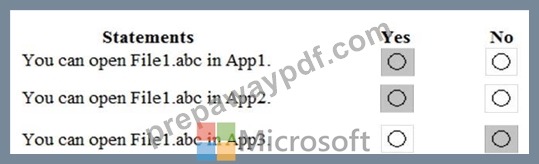
Box 1: Yes.
App1 is a protect app in the Windows Information Protection policy. File1 is stored on Server1 which is in the Network Boundary defined in the policy. Therefore, you can open File1 in App1.
Box 2: Yes.
App2 is exempt in the Windows Information Protection policy. The protection mode in the policy is block so all apps that are not included in the policy cannot be used to open the file... except for exempt apps.
Therefore, you can open File1 in App2.
Box 3: No.
The protection mode in the policy is block so all apps that are not included in the policy as protected apps or listed as exempt from the policy cannot be used to open the file. Therefore, you cannot open File from in App3.
Reference:
https://docs.microsoft.com/en-us/windows/security/information-protection/windows-information-protection/crea
NEW QUESTION 129
Your company has a Microsoft Azure Active Directory (Azure AD) tenant named contoso.onmicrosoft.com that contains the users shown in the following table.
You need to identify which users can perform the following administrative tasks:
Reset the password of User4.
Modify the value for the manager attribute of User4.
Which users should you identify for each task? To answer, select the appropriate options in the answer area.
NOTE: Each correct selection is worth one point.
Answer:
Explanation:
Reference:
https://docs.microsoft.com/en-us/azure/active-directory/users-groups-roles/directory-assign-admin-roles
NEW QUESTION 130
Your on-premises network contains five file servers. The file servers host shares that contain user data.
You plan to migrate the user data to a Microsoft 36S subscription.
You need to recommend a solution to import the user data into Microsoft OneDrive.
What should you include in the recommendation?
- A. Configure the Sync settings in the OneDrive admin center.
- B. Run the SharePoint Hybrid Configuration Wizard.
- C. Configure the Migrate of the OneDrive client on your Windows 10 device
- D. Run the SharePoint Migration Tool.
Answer: D
Explanation:
The SharePoint Migration Tool lets you migrate content to SharePoint Online and OneDrive from the following locations:
SharePoint Server 2013
SharePoint Server 2010
Network and local file shares
Reference:
https://docs.microsoft.com/en-us/sharepointmigration/introducing-the-sharepoint-migration-tool
NEW QUESTION 131
Your company has a Microsoft 365 subscription.
You need to identify which users performed the following privileged administration tasks:
Deleted a folder from the second-stage Recycle Bin if Microsoft SharePoint Opened a mailbox of which the user was not the owner Reset a user password What should you use?
- A. Security & Compliance audit log search
- B. Security & Compliance content search
- C. Microsoft Azure Active Directory (Azure AD) audit logs
- D. Microsoft Azure Active Directory (Azure AD) sign-ins
Answer: C
Explanation:
References:
https://docs.microsoft.com/en-us/azure/azure-monitor/platform/activity-logs-overview
NEW QUESTION 132
Your network contains an Active Directory forest named contoso.local.
You purchase a Microsoft 365 subscription.
You plan to move to Microsoft and to implement a hybrid deployment solution for the next 12 months.
You need to prepare for the planned move to Microsoft 365.
What is the best action to perform before you implement directory synchronization? More than one answer choice may achieve the goal. Select the
- A. Purchase a custom domain name.
- B. Create an external forest trust.
- C. Purchase a third-party X.509 certificate.
- D. Rename the Active Directory forest.
Answer: A
NEW QUESTION 133
You need to meet the technical requirements for the user licenses.
Which two properties should you configure for each user? To answer, select the appropriate properties in the answer area.
NOTE: Each correct selection is worth one point.
Answer:
Explanation:
NEW QUESTION 134
You have a Microsoft 365 Enterprise E5 subscription.
You need to enforce multi-factor authentication on all cloud-based applications for the users in the finance department.
What should you do?
- A. Create a session policy.
- B. Create a Sign-in risk policy.
- C. Create an app permission policy.
- D. Create on activity policy.
Answer: B
Explanation:
References:
https://docs.microsoft.com/en-us/azure/active-directory/identity-protection/howto-sign-in-risk-policy
NEW QUESTION 135
......
Powerful MS-100 PDF Dumps for MS-100 Questions: https://www.prepawaypdf.com/Microsoft/MS-100-practice-exam-dumps.html
Authentic MS-100 Dumps - Free PDF Questions to Pass: https://drive.google.com/open?id=1Fcs_2Drkt6vsxGmTfV6R_XBnONWI8RJd