

Certified Kubernetes Security Specialist (CKS): CKS Exam
"Certified Kubernetes Security Specialist (CKS)", also known as CKS exam, is a Linux Foundation Certification. With the complete collection of questions and answers, PrepAwayPDF has assembled to take you through 66 Q&As to your CKS Exam preparation. In the CKS exam resources, you will cover every field and category in Kubernetes Security Specialist Certification helping to ready you for your successful Linux Foundation Certification.
Instant Download: Upon successful payment, Our systems will automatically send the product you have purchased to your mailbox by email. (If not received within 12 hours, please contact us. Note: don't forget to check your spam.)


Planning a certification path, not just one exam? Discuss a long-term discount with PrepAwayPDF — the Linux Foundation Certified Kubernetes Security Specialist (CKS) set, with 66 practice questions for the CKS exam, is a good first step.
Linux Foundation CKS Exam Overview:
| Certification Vendor: | Linux Foundation / CNCF |
|---|---|
| Exam Name: | Certified Kubernetes Security Specialist |
| Exam Number: | CKS |
| Available Languages: | Simplified Chinese, English, Japanese |
| Exam Price: | $445 USD |
| Related Certifications: | Certified Kubernetes Administrator (CKA) Certified Kubernetes Application Developer (CKAD) |
| Passing Score: | 67% |
| Real Exam Qty: | 15-20 tasks |
| Exam Duration: | 120 minutes |
| Exam Format: | Hands-on tasks, Online proctored, Command-line operations, Performance-based |
| Certificate Validity Period: | 2 years |
| Recommended Training: | LFS260: Kubernetes Security Essentials |
| Exam Registration: | Linux Foundation Training Portal |
| Sample Questions: | DOWNLOAD DEMO |
| Exam Way: | Online, remotely proctored, live monitoring via webcam and screen sharing |
| Pre Condition: | Must hold valid, non-expired Certified Kubernetes Administrator (CKA) certification |
| Official Syllabus URL: | https://training.linuxfoundation.org/certification/certified-kubernetes-security-specialist/ |
Linux Foundation CKS Exam Syllabus Topics:
| Section | Weight | Objectives |
|---|---|---|
| Cluster Setup | 15% | - CIS benchmark compliance - Secure Ingress configuration - Binary verification - Node metadata protection - Network security policies |
| Supply Chain Security | 20% | - Image security & scanning - SBOM & CI/CD security - Signed artifacts & verification - Permitted registries - Static analysis tools |
| Monitoring, Logging and Runtime Security | 20% | - Behavioral analytics - Threat detection (Falco) - Audit log configuration - Incident investigation - Container immutability |
| Minimize Microservice Vulnerabilities | 20% | - Pod Security Standards - Isolation & multi-tenancy - OPA/Gatekeeper implementation - Secret management - Security contexts |
| Cluster Hardening | 15% | - Service account security - RBAC configuration - API access restriction - Component updates & vulnerability mitigation |
| System Hardening | 10% | - Network access control - Minimize OS attack surface - Least privilege IAM - Kernel hardening (AppArmor, seccomp) |
CKS Exam FAQ — Valid Answers
Must hold valid, non-expired Certified Kubernetes Administrator (CKA) certification Vendors revise eligibility rules periodically, so confirm the current requirements on the official page (official CKS exam page) before registering.
Delivery is instant — an automatic email within a minute of payment, unlimited devices, and 7*24 online service (replies within two hours) if anything's missing after 2 hours; check spam first. If you fail the corresponding CKS exam within 60 days of purchase, we refund all the cost you paid: send a scanned enrollment slip plus the official Score Report PDF within 2 days of the exam, processed within 7 days. Excluded: exams within 3 days of purchase, candidate names that don't match the payer, and free or expired products. Alternatively, exchange for two equal-value products free.
120 minutes for 15-20 tasks questions. Train the pace in advance: timed practice sessions turn the exam clock from a threat into a habit.
Yes:
Official courses build the base; the 66 practice questions for the Linux Foundation Certified Kubernetes Security Specialist (CKS) — every answer expert-verified — build the readiness.
The Linux Foundation Certified Kubernetes Security Specialist (CKS) blueprint spans 6 domains — including System Hardening (10%), Cluster Hardening (15%), Supply Chain Security (20%). Study in proportion to the weightings; the complete outline above details every subtopic.
Yes — free demo downloads let you tell whether the Linux Foundation Certified Kubernetes Security Specialist (CKS) material suits you before purchasing. Purchases include 365 days of free updates, each new version emailed immediately; renew afterward at 50% off.
Through the vendor's official registration channels:
The Linux Foundation Certified Kubernetes Security Specialist (CKS) is delivered Online, remotely proctored, live monitoring via webcam and screen sharing — choose the arrangement that fits you when booking.
$445 USD per attempt, 67% to pass. Retakes bill again at full price — prepare thoroughly with the 66 practice questions for the CKS exam at PrepAwayPDF first.
The Linux Foundation Certified Kubernetes Security Specialist (CKS) is Linux Foundation's certification exam for Certified Kubernetes Security Specialist (CKS), at the Professional level. These certifications are valued precisely because they're demanding — passing one validates real capability. Related credentials include Certified Kubernetes Administrator (CKA), Certified Kubernetes Application Developer (CKAD).
Linux Foundation Certified Kubernetes Security Specialist (CKS) Sample Questions:
SIMULATION
Create a PSP that will only allow the persistentvolumeclaim as the volume type in the namespace restricted.
Create a new PodSecurityPolicy named prevent-volume-policy which prevents the pods which is having different volumes mount apart from persistentvolumeclaim.
Create a new ServiceAccount named psp-sa in the namespace restricted.
Create a new ClusterRole named psp-role, which uses the newly created Pod Security Policy prevent-volume-policy Create a new ClusterRoleBinding named psp-role-binding, which binds the created ClusterRole psp-role to the created SA psp-sa.
Hint:
Also, Check the Configuration is working or not by trying to Mount a Secret in the pod maifest, it should get failed.
POD Manifest:
apiVersion: v1
kind: Pod
metadata:
name:
spec:
containers:
- name:
image:
volumeMounts:
- name:
mountPath:
volumes:
- name:
secret:
secretName:
Correct Answer:
See the Explanation belowExplanation:
apiVersion: policy/v1beta1
kind: PodSecurityPolicy
metadata:
name: restricted
annotations:
seccomp.security.alpha.kubernetes.io/allowedProfileNames: 'docker/default,runtime/default' apparmor.security.beta.kubernetes.io/allowedProfileNames: 'runtime/default' seccomp.security.alpha.kubernetes.io/defaultProfileName: 'runtime/default' apparmor.security.beta.kubernetes.io/defaultProfileName: 'runtime/default' spec:
privileged: false
# Required to prevent escalations to root.
allowPrivilegeEscalation: false
# This is redundant with non-root + disallow privilege escalation,
# but we can provide it for defense in depth.
requiredDropCapabilities:
- ALL
# Allow core volume types.
volumes:
- 'configMap'
- 'emptyDir'
- 'projected'
- 'secret'
- 'downwardAPI'
# Assume that persistentVolumes set up by the cluster admin are safe to use.
- 'persistentVolumeClaim'
hostNetwork: false
hostIPC: false
hostPID: false
runAsUser:
# Require the container to run without root privileges.
rule: 'MustRunAsNonRoot'
seLinux:
# This policy assumes the nodes are using AppArmor rather than SELinux.
rule: 'RunAsAny'
supplementalGroups:
rule: 'MustRunAs'
ranges:
# Forbid adding the root group.
- min: 1
max: 65535
fsGroup:
rule: 'MustRunAs'
ranges:
# Forbid adding the root group.
- min: 1
max: 65535
readOnlyRootFilesystem: false
SIMULATION

Two tools are pre-installed on the cluster's worker node:
Using the tool of your choice (including any non pre-installed tool), analyze the container's behavior for at least 30 seconds, using filters that detect newly spawning and executing processes.
Store an incident file at /opt/KSRS00101/alerts/details, containing the detected incidents, one per line, in the following format:
The following example shows a properly formatted incident file: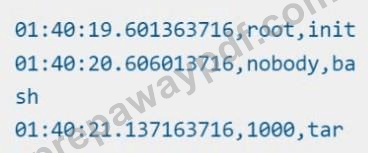


Correct Answer:
See explanation below
Explanation:


SIMULATION
Context:
Cluster: gvisor
Master node: master1
Worker node: worker1
You can switch the cluster/configuration context using the following command:
[desk@cli] $ kubectl config use-context gvisor
Context: This cluster has been prepared to support runtime handler, runsc as well as traditional one.
Task:
Create a RuntimeClass named not-trusted using the prepared runtime handler names runsc.
Update all Pods in the namespace server to run on newruntime.
Correct Answer:
See the Explanation below
Explanation:
Explanation:
[desk@cli] $vim runtime.yaml
apiVersion: node.k8s.io/v1
kind: RuntimeClass
metadata:
name: not-trusted
handler: runsc
[desk@cli] $ k apply -f runtime.yaml
[desk@cli] $ k get pods
NAME READY STATUS RESTARTS AGE
nginx-6798fc88e8-chp6r 1/1 Running 0 11m
nginx-6798fc88e8-fs53n 1/1 Running 0 11m
nginx-6798fc88e8-ndved 1/1 Running 0 11m
[desk@cli] $ k get deploy
NAME READY UP-TO-DATE AVAILABLE AGE
nginx 3/3 11 3 5m
[desk@cli] $ k edit deploy nginx
SIMULATION
Fix all issues via configuration and restart the affected components to ensure the new setting takes effect.
Fix all of the following violations that were found against the API server:- a. Ensure the --authorization-mode argument includes RBAC b. Ensure the --authorization-mode argument includes Node c. Ensure that the --profiling argument is set to false Fix all of the following violations that were found against the Kubelet:- a. Ensure the --anonymous-auth argument is set to false.
b. Ensure that the --authorization-mode argument is set to Webhook.
Fix all of the following violations that were found against the ETCD:-
a. Ensure that the --auto-tls argument is not set to true
Hint: Take the use of Tool Kube-Bench
Correct Answer:
API server:
Ensure the --authorization-mode argument includes RBAC
Turn on Role Based Access Control.
Role Based Access Control (RBAC) allows fine-grained control over the operations that different entities can perform on different objects in the cluster. It is recommended to use the RBAC authorization mode.
Fix - Buildtime
Kubernetes
apiVersion: v1
kind: Pod
metadata:
creationTimestamp: null
labels:
component: kube-apiserver
tier: control-plane
name: kube-apiserver
namespace: kube-system
spec:
containers:
- command:
+ - kube-apiserver
+ - --authorization-mode=RBAC,Node
image: gcr.io/google_containers/kube-apiserver-amd64:v1.6.0
livenessProbe:
failureThreshold: 8
httpGet:
host: 127.0.0.1
path: /healthz
port: 6443
scheme: HTTPS
initialDelaySeconds: 15
timeoutSeconds: 15
name: kube-apiserver-should-pass
resources:
requests:
cpu: 250m
volumeMounts:
- mountPath: /etc/kubernetes/
name: k8s
readOnly: true
- mountPath: /etc/ssl/certs
name: certs
- mountPath: /etc/pki
name: pki
hostNetwork: true
volumes:
- hostPath:
path: /etc/kubernetes
name: k8s
- hostPath:
path: /etc/ssl/certs
name: certs
- hostPath:
path: /etc/pki
name: pki
Ensure the --authorization-mode argument includes Node
Remediation: Edit the API server pod specification file /etc/kubernetes/manifests/kube-apiserver.yaml on the master node and set the --authorization-mode parameter to a value that includes Node.
--authorization-mode=Node,RBAC
Audit:
/bin/ps -ef | grep kube-apiserver | grep -v grep
Expected result:
'Node,RBAC' has 'Node'
Ensure that the --profiling argument is set to false
Remediation: Edit the API server pod specification file /etc/kubernetes/manifests/kube-apiserver.yaml on the master node and set the below parameter.
--profiling=false
Audit:
/bin/ps -ef | grep kube-apiserver | grep -v grep
Expected result:
'false' is equal to 'false'
Fix all of the following violations that were found against the Kubelet:- Ensure the --anonymous-auth argument is set to false.
Remediation: If using a Kubelet config file, edit the file to set authentication: anonymous: enabled to false. If using executable arguments, edit the kubelet service file /etc/systemd/system/kubelet.service.d/10-kubeadm.conf on each worker node and set the below parameter in KUBELET_SYSTEM_PODS_ARGS variable.
--anonymous-auth=false
Based on your system, restart the kubelet service. For example:
systemctl daemon-reload
systemctl restart kubelet.service
Audit:
/bin/ps -fC kubelet
Audit Config:
/bin/cat /var/lib/kubelet/config.yaml
Expected result:
'false' is equal to 'false'
2) Ensure that the --authorization-mode argument is set to Webhook.
Audit
docker inspect kubelet | jq -e '.[0].Args[] | match("--authorization-mode=Webhook").string' Returned Value: --authorization-mode=Webhook Fix all of the following violations that were found against the ETCD:- a. Ensure that the --auto-tls argument is not set to true Do not use self-signed certificates for TLS. etcd is a highly-available key value store used by Kubernetes deployments for persistent storage of all of its REST API objects. These objects are sensitive in nature and should not be available to unauthenticated clients. You should enable the client authentication via valid certificates to secure the access to the etcd service.
Fix - Buildtime
Kubernetes
apiVersion: v1
kind: Pod
metadata:
annotations:
scheduler.alpha.kubernetes.io/critical-pod: ""
creationTimestamp: null
labels:
component: etcd
tier: control-plane
name: etcd
namespace: kube-system
spec:
containers:
- command:
+ - etcd
+ - --auto-tls=true
image: k8s.gcr.io/etcd-amd64:3.2.18
imagePullPolicy: IfNotPresent
livenessProbe:
exec:
command:
- /bin/sh
- -ec
- ETCDCTL_API=3 etcdctl --endpoints=https://[192.168.22.9]:2379 --cacert=/etc/kubernetes/pki/etcd/ca.crt
--cert=/etc/kubernetes/pki/etcd/healthcheck-client.crt --key=/etc/kubernetes/pki/etcd/healthcheck-client.key get foo failureThreshold: 8 initialDelaySeconds: 15 timeoutSeconds: 15 name: etcd-should-fail resources: {} volumeMounts:
- mountPath: /var/lib/etcd
name: etcd-data
- mountPath: /etc/kubernetes/pki/etcd
name: etcd-certs
hostNetwork: true
priorityClassName: system-cluster-critical
volumes:
- hostPath:
path: /var/lib/etcd
type: DirectoryOrCreate
name: etcd-data
- hostPath:
path: /etc/kubernetes/pki/etcd
type: DirectoryOrCreate
name: etcd-certs
status: {}


SIMULATION
Given an existing Pod named nginx-pod running in the namespace test-system, fetch the service-account-name used and put the content in /candidate/KSC00124.txt Create a new Role named dev-test-role in the namespace test-system, which can perform update operations, on resources of type namespaces.
Create a new RoleBinding named dev-test-role-binding, which binds the newly created Role to the Pod's ServiceAccount ( found in the Nginx pod running in namespace test-system).
Correct Answer:
See the Explanation belowExplanation:


Over 64705+ Satisfied Customers

 1257 Customer ReviewsCustomers Feedback (* Some similar or old comments have been hidden.)
Can you give me more discount?
Valid CKS real exam questions from PrepAwayPDF.
Kelly

Your Q&As are very good for the people who do not have much time for their exam preparation. The materials are very accurate. With it, I passed CKS easily.
Horace
Boss requests me to pass exam in this month. I passed yesterday. O ha
Orville
Perfect file with so many helpful CKS exam questions! I passed my exam with it. Nice purchase! Thanks!
Merlin
I would study PrepAwayPDF CKS real exam questions for 2 weeks and take the test.
Sophia
The CKS study guide helped a lot on my way to success and it is a great reference material. I used it's dump 2 times, and passed my exam in a short time.
Rosalind

Questions and answers for certified CKS exam were very similar to the original exam. I highly recommend everyone prepare with the pdf study guide by PrepAwayPDF.
Eileen
I attended the CKS exam several days ago, and I could do most questions since I had practiced them in CKS exam torrent, they built up my confidence.
Myron
Thank you for your CKS dump training course.
Everley
Perfect study tool! I used your CKS dump to prepare for my CKS exam and passed the exam with a good score! Thank you!
Eudora
I didn't expect CKS dump was so wonderful that it coverd all of the real questions. Thank you!
Barret
Passed the CKS exam easily! The content of the exam file is easy to follow and i remember all the Q&A clearly.
Haley
I obtained a good score in the CKS exam, I would recommend CKS exam dump to you if you sre intending to go for CKS exam.
Hayden
After my firend introduce CKS exam dupms to me, I decide to try t. I'm really happy I didn't make a wrong decision, because CKS exam dumps have helped me pass my exam. Thanks a lot.
Max
I passed the CKS today. The CKS exam dumps are valid and i bought them with a very good price. I definitely think it is a great deal! Thanks so much!
Aubrey
Best pdf exam dumps for Kubernetes Security Specialist exam available at PrepAwayPDF. I just studied with the help of these and got 90% marks. Thank you team PrepAwayPDF.
Edwiin
Updated dumps with valid content for CKS certification exam at PrepAwayPDF. I scoured 97% marks studying from them.
Abner
I passed this exam with CKS dumps and got 92% marks. Some questions from dumps were even in the exam.
Howar
I bought the PDF version of the CKS exam questions, and i passed the CKS exam with it. The CKS exam dump is enough to pass the exam!
Herman
Security & Privacy
We respect customer privacy. We use McAfee's security service to provide you with utmost security for your personal information & peace of mind.
365 Days Free Updates
Free update is available within 365 days after your purchase. After 365 days, you will get 50% discounts for updating.
Instant Download
After Payment, our system will send you the products you purchase in mailbox in a minute after payment. If not received within 2 hours, please contact us.
Money Back Guarantee
Full refund if you fail the corresponding exam in 60 days after purchasing. And Free get any another product.
